# Acknowledgment
URL: /docs/acknowledgment
Acknowledgment, references, and links for Intl-T
***
title: Acknowledgment
description: Acknowledgment, references, and links for Intl-T
-------------------------------------------------------------
## References
### Acknowledgment
* [dx\_over\_dt's Stack Overflow answer,](https://stackoverflow.com/a/64418639/29393046) demonstrates how to override the `[Symbol.iterator]` method of a `String` object to prevent character-by-character rendering in React. This idea helped shape earlier versions of Intl-T.
* [Kent C. Dodds's blog post,](https://kentcdodds.com/blog/rendering-a-function-with-react) explores a clever way to trick React into rendering functions as children. Although, this approach is no longer supported due to `react-reconciler`. It provides historical context that eventually led to the strategy used in Intl-T.
### Mentions
* Featured in [Next.js Weekly issue #90](https://nextjsweekly.com/issues/90) as an unique node-based system for organizing translations
* [First Reddit Post](https://www.reddit.com/r/nextjs/comments/1l6x8wg/i_develop_a_fullytyped_objectbased_i18n) shared on r/nextjs, introducing `intl-t` and received feedback from the community.
***
## Links
***
# Contributing
URL: /docs/contributing
Ideas and plans for future features and improvements
***
title: Contributing
description: Ideas and plans for future features and improvements
-----------------------------------------------------------------
## Guidelines
Contributions are welcome! If you have ideas, suggestions, or improvements, feel free to open an issue or pull request.
## Roadmap
Here are some planned features and improvements for future:
* **Translations Merging:** Support for dynamically merging and extending translation namespaces for each independent node in the tree, enabling on-demand loading and updates.
* **CLI Tooling:** Command-line utilities for managing, validating, and extracting translations.
* **Documentation Web:** A web-based documentation site for Intl-T, providing examples, guides, and API references.
* **Documentation Enhancement:** Improve docs such as `AGENTS.md`, `CONTRIBUTING.md` to provide clearer and more practical guidance for contributors.
* **Editor Integrations:** VSCode plugin for enhanced translation management.
* **Improved ICU Support:** More advanced ICU message format features.
* **Performance Optimizations:** Further reduce bundle size and improve runtime efficiency.
* **Plugins:** Support for third-party plugins and integrations.
* **Testing:** Add robust testing for Intl-T to ensure its reliability.
* **More frameworks:** Support for more popular frameworks and libraries, including backend frameworks.
* **Implement new features:** For example, localization for pathnames.
* **Modular and agnostic:** To ensure agnosticism, Intl-T will be a monorepo with separate modules for different environments and features (e.g., `@intl-t/next`, `@intl-t/utils`, `@intl-t/server`, etc.)
* **Intl-T Server:** Easily self-host translations with a simple API that is agnostic and compatible with the intl-t client.
* **Intl-T l10n Service:** A simple service for providing translation management to your application through intl-t API.
* **Crowdin Integration:** Integration with Crowdin for efficient translation management and dynamic loading.
* **TypeScript Augmentation:** Allow augmenting the `intl-t` module so the default `t` object can be imported directly from the package with full type inference.
### Progress Table
🔴 Planned
🟡 In Progress
🔵 Almost there
🟢 Completed
| Feature | Status |
| --------------------------------- | ------ |
| Modular and agnostic | 🔵 |
| Translations Merging | 🔴 |
| CLI Tooling | 🔴 |
| Documentation web | 🟢 |
| Documentation enhancement | 🟡 |
| Edge Runtime Support | 🔵 |
| IDE Integration | 🔴 |
| Improved ICU Support | 🔴 |
| Performance Optimizations | 🔴 |
| Testing | 🟡 |
| More frameworks support | 🔴 |
| `@intl-t/server` | 🔴 |
| Intl-T Service | 🔴 |
| Crowdin Integration | 🔴 |
| Enhance dynamic import strategies | 🔴 |
| TypeScript Augmentation | 🔴 |
| Enhance TypeScript type inference | 🔴 |
| Debugging | 🔴 |
| Plugins | 🔴 |
Have a feature request? [Open an issue](https://github.com/nivandres/intl-t/issues) or join the [Discord](https://discord.gg/5EbCXKpdyw).
# Dynamic Import
URL: /docs/dynamic-import
Load locales dynamically
***
title: Dynamic Import
description: Load locales dynamically
-------------------------------------
> Dynamic Import
There are several ways to dynamically import locales. Dynamic locale importing consists in loading only the translations you actually need. You may not need to use dynamic importing, but if you do, please read this section carefully for a complete overview.
## Nodes as dynamic functions
To dynamically import locales, set node values as functions to be called when needed.
```ts
import { Translation } from "intl-t";
export const t = new Translation({
locales: {
en: () => import("./en.json"),
es: () => import("./es.json"),
},
});
await t; // Automatically imports the locale that is needed at client or server
```
```ts
import { createTranslation } from "intl-t";
// use await at createTranslation to preload default locale
export const { t } = await createTranslation({
locales: {
en: () => import("./en.json"),
es: () => import("./es.json"),
},
hydration: false, // disable hydration to automatically load the correct client locale
}); // This is not recommended for hydration environments
```
Or you can import the locales dynamically and assert the type in this way.
```ts
type Locale = typeof import("./en.json");
createTranslation({
locales: locale => import(`./${locale}.json`) as Promise, // default type is inferred
allowedLocales: ["en", "es"], // It is important to specify locales
});
```
## `getLocales` function
`getLocales` function is a way to preload locales dynamically depending if it is client or server. If you are invoking from server it preloads with a top-level await, but if you are invoking from client it will dynamically import the locales. If you are using [static rendering](/docs/next#static-rendering) with [React Provider](/docs/react#provider), the right locale will be automatically handled and sent to the client.
```ts
import { createTranslation, getLocales } from "intl-t";
// `allowedLocales` as locale list, e.g. ["en", "es"] as const; !important use `as const`
import { allowedLocales } from "./locales";
const locales = await getLocales(locale => import(`./messages/${locale}.json`), allowedLocales); // Preload locales at server and dynamically imported at client
export const { t } = createTranslation({ locales });
```
`getLocales(cb, locales, preload?)`
If your import function doesn't return the type directly, you can assert it in this way.
```ts
type Locale = typeof import("./messages/en.json");
await getLocales(locale => import(`./messages/${locale}.json`) as Promise, allowedLocales);
```
`getLocales` function also supports preloading locales with locales record. `{ en: [AsyncFunction] }`
`getLocales(locales record, list?, preload?)`
## Preload Locales
Preload option is a way to implement `getLocales` function directly at create translation, instead of using `await getLocales` you will use `await` directly on the translation object.
```ts
await createTranslation({
locales: locale => import(`./messages/${locale}.json`) as Promise,
preload: true, // e. g. preload all locales depending if is server or whichever condition
});
```
Actually when using locales as callback, it will automatically turn on preload and use !isClient as default condition.
```ts
await createTranslation({
locales: {
en: () => ({ hello: "Hello World!" }),
es: new Promise(r => r({ hello: "¡Hola Mundo!" })) as { hello: "¡Hola Mundo!" }, // intl-t supports promises but it is need to assert the type
fr: async () => ({ hello: "Bonjour le monde!" }),
ja: { hello: "こんにちは世界!" },
},
preload: true, // preloads all locales when using `await`
});
```
When `preload` is enabled, the first `await` invocation will preload all locales. By default, if `preload` is not specified and you use `await`, only the current locale is preloaded. Additionally, if you provide a callback for `locales`, `preload` is enabled automatically and all locales are preloaded on the server by default.
Enabling `preload` turns the top-level translation object into a promise that resolves when all locales are loaded. Therefore, if you enable `preload`, remember to use `await` with `createTranslation`. In this case, you cannot use the `new Translation` syntax, as you cannot use `await` with `new`.
However, intl-t is flexible: if you enable `preload` but do not use `await`, it will behave as a normal translation object without preloading. You can simply use `await` on the specific locales you need. (But it is the same as having `preload: false`)
```ts
const t = createTranslation({
locales: {
en: async () => ({ hello: "Hello World!" }),
es: async () => ({ hello: "¡Hola Mundo!" }),
fr: () => ({ hello: "Bonjour le monde!" }),
ja: async () => ({ hello: "こんにちは世界!" }),
},
preload: false, // preloads all locales when using top-level `await`
});
t.hello; // undefined
(await t.es).hello; // "¡Hola Mundo!"
t.fr.hello; // "Bonjour le monde!" // It works because it is just a function without promise
(await t.en).hello; // "Hello World!"
// `t.en` It is being preloaded without preloading the rest of locales, even when preload is on, because it is being used after accessing the specific locale
(await t.es).hello; // "¡Hola Mundo!" // Already resolved, it doesn't do unnecessary reloads
```
You can test and debug the locale loads in the console and you can see the locales being loaded and resolved.
Not repeated nodes, not unnecessary reloads, just the same independent nodes, proxies, instances, values and locales.
## Server-Side importing
A way to preload all locales at server is to separate the translations into different files and import them at the server.
Client or server file:
```ts title="i18n/translation.ts"
import { createTranslation } from "intl-t/next";
export const { t } = await createTranslation({
locales: {} as {
es: typeof import("./messages/es.json");
en: typeof import("./messages/en.json");
},
allowedLocales: ["en", "es"], // It is important to specify in this case
});
```
Only server file:
```ts title="i18n/server.ts"
import en from "./messages/en.json";
import es from "./messages/es.json";
import { t } from "./translation";
t.en.setSource(en);
t.es.setSource(es);
// or
t.settings.getLocale = locale => import(`./messages/${locale}.json`);
```
Then in your server-side code. It could be only the root layout, API endpoints and server actions.
```tsx
import { Translation } from "./i18n/server";
export default function RootLayout({ children }) {
return (
{/* Automatically send the translations to the client */}
{children}
);
}
```
This method is not totally recommended due to some errors when building with Next.js. It is a example of how flexible you can handle your translations and dynamic loads and imports.
If you're getting started with `intl-t` and dynamic imports, you may want to begin by [setting nodes as dynamic functions](#nodes-as-dynamic-functions).
Some of these dynamic locales importing strategies are unstable and may not work as expected. You may find the next error when building with Next.js:
> Linting and checking validity of types ..Debug Failure. False expression.
> Next.js build worker exited with code: 1 and signal: null
> error: script "build" exited with code 1
This occurs when using `import("...")` and `bundle` module resolution in `tsconfig.json`. In this case, you can disable typescript check with Next.js
```ts title="next.config.js"
const nextConfig = {
typescript: {
ignoreBuildErrors: true,
},
};
```
Or use `import en from "./en.json"` instead of `await import("./en.json")`.
# Edge
URL: /docs/edge
Special Edge Runtimes Compatibility Warning
***
title: Edge
description: Special Edge Runtimes Compatibility Warning
--------------------------------------------------------
### Edge Runtimes Compatibility Warning
Edge environments, such as Cloudflare Workers, Vercel Edge Functions, and Cloudflare Pages, are only partially supported and have various limitations and caveats.
Since `new Function` cannot be executed in edge environments, Translation Node Proxies created from a new function cannot be functions anymore. This means you won't be able to call them directly. Instead, you'll need to use methods like `.use` or `.get` to perform actions. Also some variable injections may not work as expected.
```ts
// From
const t = getTranslation();
t("hello");
t.greetings({ name: "John" });
// To
const t = getTranslation(); // Also hooks lose their proxy properties
t.get("hello"); // or t.hello
t.greetings.use({ name: "John" }); // .use and .get are the same
```
The upside is that, since these proxies become string objects rather than function objects, this offers better compatibility in some environments and eliminates the need for workarounds such as React Patch. However, this limitation only applies to edge environments.
The current solution is a temporary workaround. In the future, full compatibility will be achieved, as there are ways in JavaScript that can provide the desired behavior and even allow you to choose between string objects or function objects as needed, thus avoiding the need for workarounds like the React Patch.
# Examples & Strategies
URL: /docs/examples
Practical patterns and edge cases
***
title: Examples & Strategies
description: Practical patterns and edge cases
----------------------------------------------
## Locales metadata
You can include metadata in your translation files to help you with localization and translation management.
For example
```jsonc
{
"meta": {
// It is a normal node
"code": "en",
"name": "English",
"dir": "ltr",
},
// ...
}
```
And then you can access it from your translations.
```tsx
import { Translation, t } from "@/i18n/translation";
import { match } from "intl-t/utils";
interface Props {
params: Promise<{ locale: string }>;
}
export default function RootLayout({ children, params }) {
let { locale } = await params;
locale = match(locale, t.allowedLocales);
const { meta } = await t[locale]; // Preload if you are using dynamic import without TranslationProvider that will preload translations
return (
{children}
);
}
```
## Fallbacks
When a translation node is executed and the translation is not found, it will fall back to the input text with injected variables. This could be useful when you receive a string from an external API or server. You might get either a translation key or the direct text.
```ts
t("Please try again"); // falls back to "Please try again"
t("messages.try_again"); // outputs the translation
t("Please try again, {name}", { name: "John" }); // falls back to "Please try again, John"
// these fallbacks are also type safe
typeof t("Please try again, {name}"); // `Please try again, ${string}`
```
## String Methods
```tsx
{t.description.split(" ").map((word, index, words) => {
return (
{word + " "}
);
})}
```
## Template Strings
```tsx
async function Greeting() {
"use server";
return t`greeting`({ name: await getName() });
}
```
## Namespaces
Namespaces are a way to simulate isolated translation contexts in your application. While intl-t does not natively support namespaces as a built-in feature, you can achieve similar separation by organizing your translation files and configuration per feature or section.
For example, you might have:
`app/protected/i18n/translation.ts`
`i18n/translation.ts`
`app/docs/i18n/translation.ts`
Each of these files can export its own translation instance:
```ts title="protected/i18n/translation.ts"
import { createTranslation } from "intl-t";
import en from "./locales/en.json";
export const { t: protectedT } = createTranslation({ locales: { en } });
```
```ts title="docs/i18n/translation.ts"
import { createTranslation } from "intl-t";
import en from "./locales/en.json";
export const { t: docsT } = createTranslation({ locales: { en } });
```
You can then import and use the appropriate translation object in each part of your app:
```ts
import { docsT } from "../../docs/i18n/translation";
import { protectedT } from "../i18n/translation";
protectedT("dashboard.title");
docsT("guide.intro");
```
Renaming is not required; this is just for demonstration purposes. Simply import from the appropriate folders.
If you are sending translations dynamically to the client via React, you must use a [`TranslationProvider`](/docs/react#provider) for each isolated translation instance.
You can also implement different strategies for each isolated translation, such as using only [dynamic](/docs/next/dynamic-rendering) translation loading or preloading at server-side and dynamically importing at client-side.
**This approach keeps translations isolated. In the future, intl-t may support merging or extending translations dynamically, but for now, this pattern allows you to simulate namespaces effectively.**
# Overview
URL: /docs
Introduction for Intl-T
***
title: Overview
description: Introduction for Intl-T
------------------------------------
## Intl-T
`intl-t` is a fully-typed, object-based internationalization (i18n) library for TypeScript, React, and Next.js. It offers a type-safe and amazing developer experience for managing translations in modern applications.
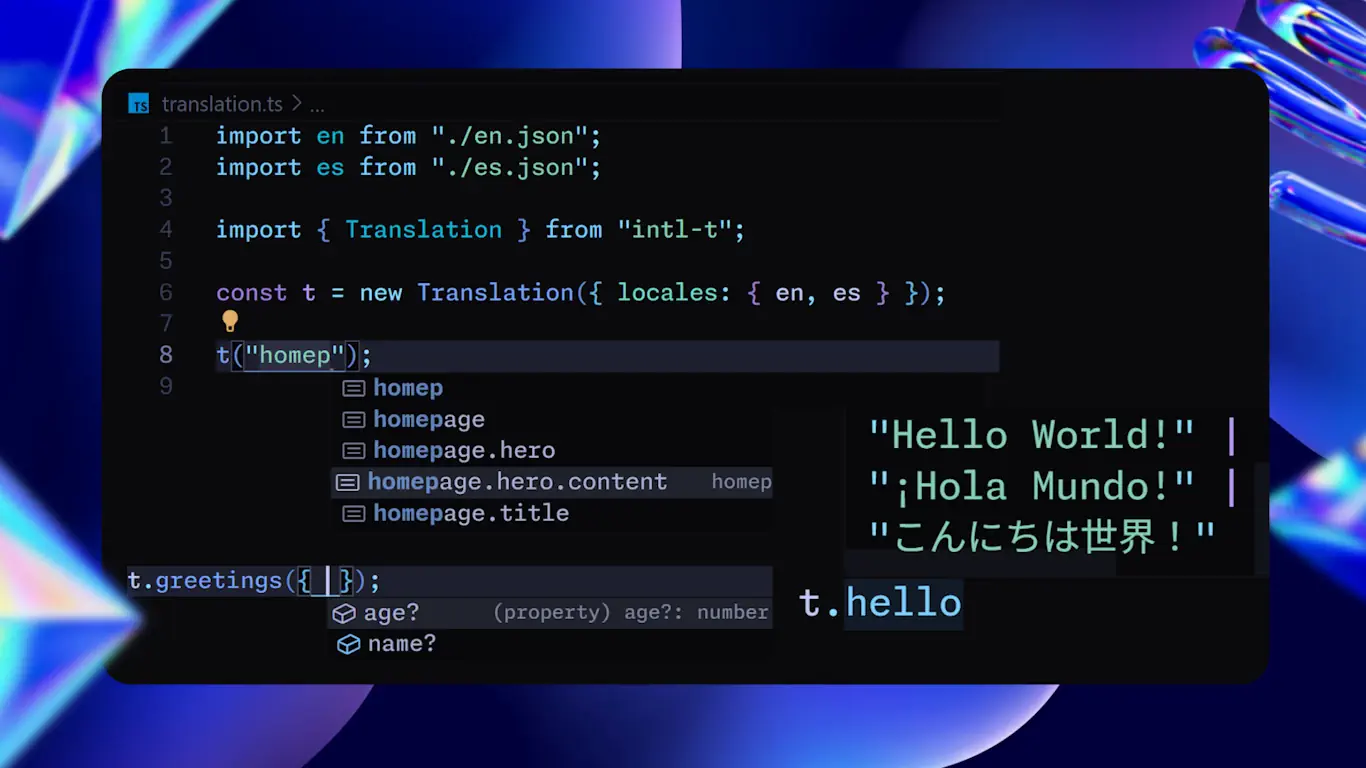
> A Fully-Typed Object-Based i18n Translation Library for TypeScript, React, and Next.js.
### Features
* 🎯 Fully-Typed for TypeScript with autocomplete for translation variables
* 🌲 Node-based translations for easy organization and management
* ✨ Type-safe translation keys, values and all sub-nodes
* 🚚 Supports JSON files and dynamic remote imports
* 🪄 Flexible syntax integrating all the best parts of other i18n libraries
* 🧩 ICU message format support and extended for complex and nested pluralization and formatting
* ⚛️ React components injections out of the box with translation variables
* 🚀 Supports server-side rendering and static rendering with Next.js and React
* 🔄 Dynamic importing of locales for optimized bundle size and on-demand language loading
* ⚙️ Modular and agnostic to any framework or library
* 📦 Lightweight bundle with no dependencies and Tree-Shakable
## Demo
;
}
```
[Read more about static rendering with Intl-T](/docs/next#static-rendering)
**With React Server Components (Dynamic):**
If you don't provide a Translation Provider or don't use `setRequestLocale` if required, you can use `await getTranslation()` for dynamic rendering in Next.js.
```tsx
import { getTranslation } from "@/i18n/translation";
export default function Component() {
const t = await getTranslation();
return
{t("greeting", { name: "Ivan" })}
;
}
```
[Read more about dynamic rendering with Intl-T](/docs/next#dynamic-rendering)
**With Server Actions:**
The locale is automatically detected from headers.
```ts
"use server";
import { getTranslation } from "@/i18n/translation";
export function greeting() {
const t = await getTranslation(); // use await to get locale from headers
return t("greeting", { name: "Ivan" });
}
```
**With Client Components (Hydration):**
```tsx
"use client";
import { useTranslation } from "@/i18n/translation";
export default function Component() {
const { t } = useTranslation();
return
{t("greeting", { name: "Ivan" })}
;
}
```
For easier migration from other i18n libraries, you can use the `getTranslations` and `useTranslations` aliases, exactly the same and keep type safety. `getTranslation` and `useTranslation` are functionally the same and adapt depending on the environment.
You can also use them as translation object directly, e.g., `useTranslation.greeting.es({ name: "Ivan" })`—it's modular, type-safe, and flexible.
**With metadata:**
```tsx
// layout.tsx
export async function generateMetadata({ params }) {
const { locale } = await params;
setRequestLocale(locale);
const t = await getTranslation();
return t.metadata.toJSON();
}
```
**Link Navigation Component:**
```tsx
import { Link } from "@/i18n/navigation";
import { Translation } from "@/i18n/translation";
export default function LanguageSwitcher() {
const { Translation, t } = useTranslation("languages");
return (
);
}
```
**Router Hook:**
```tsx
import { useRouter } from "@/i18n/navigation";
export default function Component() {
const router = useRouter();
function onClick() {
router.push("/hello", { locale: "fr" });
}
return (
{router.locale} {router.pathname}
);
}
```
# Next.js
URL: /docs/next
Next.js integration for Intl-T
***
title: Next.js
description: Next.js integration for Intl-T
-------------------------------------------
## Overview
intl-t offers special integration with Next.js for server-side rendering and routing:
For Static Rendering you will need to generate static params for each locale.
In dynamic pages with just `await getTranslation()` you can get the translation with current locale from headers.
`getTranslation` also has `getTranslations` as an alias.
> Note: `intl-t/next` is for Next.js App with RSC. For Next.js Pages you should use `intl-t/react` instead, and `intl-t/navigation` for Next.js Navigation and Routing tools.
```ts
// Important: use intl-t/next or @intl-t/next
import { createTranslation } from "intl-t/next";
import en from "./messages/en.json";
import es from "./messages/es.json";
export const { Translation, useTranslation, getTranslation } = await createTranslation({ locales: { en, es } });
```
## Navigation
Import `createNavigation` from `intl-t/navigation` and pass the allowed locales. Don't import createNavigation from `intl-t/next` in order to use it from middleware.
```ts title="i18n/navigation.ts"
import { createNavigation } from "intl-t/navigation";
export const { middleware, Link, generateStaticParams } = createNavigation({ allowedLocales: ["en", "es"], defaultLocale: "en" });
```
```tsx title="app/[locale]/layout.tsx"
import { Translation } from "@/i18n/translation";
export { generateStaticParams } from "@/i18n/navigation";
interface Props {
params: Promise<{ locale: typeof Translation.locale }>;
children: React.ReactNode;
}
export default async function RootLayout({ children, params }: Props) {
const { locale } = await params;
if (!Translation.locales.includes(locale)) return;
return (
{children}
);
}
```
That translation component is a React Server Component that handles the current locale and the corresponding translations to be sent to the client and its context.
Also, `Translation` will work too as a client-side translation component.
```ts title="middleware.ts"
export { middleware as default } from "@/i18n/navigation";
export const config = {
// middleware matcher config
};
```
If you need to customize your middleware or chain multiple middlewares, you can use the `withMiddleware` function to wrap your middleware in a chain.
```ts title="i18n/navigation.ts"
import { createNavigation } from "intl-t/navigation";
export const { withMiddleware, Link, generateStaticParams, useRouter } = createNavigation({ allowedLocales, defaultLocale });
// middleware.ts
import { withMiddleware } from "intl-t/navigation";
function middleware(request, event) {
// do something
}
export default withMiddleware(middleware);
```
`withMiddleware` and `middleware` both return the response. `middleware` function also can receive the response as the last argument, so you can configure it in a flexible way.
```ts
middleware(request, event, response);
```
From `createNavigation` you can get:
* `middleware`: Middleware function to be used in `middleware.ts`
* `generateStaticParams`: Function to generate static params
* `useRouter`: React hook to get router config with binded `locale` and `pathname` values
* `Link`: React component to create links with binded `locale` and `pathname` values
* `redirect`: Binded Next.js `redirect` function
* `permanentRedirect`: Binded Next.js `permanentRedirect` function
* `getLocale`: Function to get current locale at server
* `useLocale`: React hook to get current locale
* `usePathname`: React hook to get current pathname without locale prefix if exist
* `getPathname`: Function to get current pathname without locale prefix if exist
### Router Hook
`useRouter` hook is a wrapper for Next.js `useRouter` hook, but it will resolve the locale and pathname at client and server dynamically.
```ts
const router = useRouter();
router.push("/hello", { locale: "fr" }); // Handles automatically the locale
router.pathname; // "/fr/hello"
router.locale; // "fr"
```
Pathname and locale are resolved through other hooks with getters, so you can use them dynmically when need, like old Next.js `useRouter` hook.
### **Resolvers Config**
When creating navigation, you can configure the routing structure using resolvers like `resolvePath` and `resolveHref` to match the correct locale and path.
```ts
interface Config {
pathPrefix?: "always" | "default" | "optional" | "hidden";
pathBase?: "always-default" | "detect-default" | "detect-latest";
strategy?: "param" | "request";
redirectPath?: string;
}
```
* **`pathPrefix`**: Controls how the locale appears in the URL path.
* `"always"`: The locale is always included as a path prefix.
* `"default"`: The default locale is hidden in the path, while other locales are shown.
* `"optional"`: The locale prefix can be present or absent, depending on the accessed URL.
* `"hidden"`: The locale is never shown in the path prefix.\
*Default is `"default"` for `strategy: "param"` and `"hidden"` for `strategy: "request"`.*
* **`pathBase`**: Determines the behavior when no locale is specified in the path.
* `"always-default"`: The path base `/` always routes to the default locale.
* `"detect-default"`: On the first visit, the user's locale is detected and redirected; subsequent visits at path base go to the default locale.
* `"detect-latest"`: On the first visit, the user's locale is detected and redirected; subsequent visits at path base go to the most recently used locale.\
*Default is `"detect-default"` when the effective `pathPrefix` is visible and `"detect-latest"` when it is `"hidden"`.*
* **`strategy`**: Specifies how to match the locale and path.
* `"param"`: Uses the locale path segment, typically the Next.js `[locale]` param. This is the static-friendly mode.
* `"request"`: Resolves the locale dynamically from request state, such as custom detection, headers, cookies, or domain-derived logic. Middleware stores the resolved locale in both headers and cookies for later reads.
`"request"` does not require a `[locale]` route segment. Its default canonical URL is unprefixed, but you can still expose locale prefixes by setting `pathPrefix`.
* **`redirectPath`**: Sets a custom path for redirecting users to the appropriate locale.\
For example, if you are sending an email and don't know the user's locale, you can use a prefix path like `/r` to redirect to the default locale, or set it to any path you prefer.
* **`detect`**: Callback function to detect the locale from the Next Request. E. g. from domain, geolocation, etc.
All these configurations are compatible and are used internally throughout the intl-t tools.
You can set these options in the `createNavigation` function.
There are also additional configuration options you may want to explore.
```ts title="i18n/navigation.ts"
import { createNavigation } from "intl-t/navigation";
export const { middleware, Link, generateStaticParams, useRouter } = createNavigation({
allowedLocales: ["en", "es"],
defaultLocale: "en",
// custom
pathPrefix: "hidden",
pathBase: "always-default",
});
```
```ts title="i18n/translation.ts"
import en from "@/public/locales/en.json";
import es from "@/public/locales/es.json";
import { createTranslation } from "intl-t";
export const { t } = createTranslation({
locales: {
en,
es,
},
});
```
## NotFound Page Warning
When using the param strategy (`[locale]`) with middleware in Next.js, you may encounter unexpected behavior when a page is not found: Next.js will redirect to `app/not-found.tsx`, which is outside the `[locale]` wrapper. To resolve this, use a `[...404]` dynamic param inside `[locale]` to catch all unmatched routes. Then, call the `notFound` function from Next.js to redirect users to the correct `not-found.tsx` page within the expected locale folder.
This workaround will likely not be needed in future versions of Next.js.
## Static Rendering
```ts title="i18n/translation.ts"
import { Translation } from "intl-t/next";
export const { getTranslation, setLocale } = new Translation({ locales: { en: "Hello world" } });
```
```jsx
import { getTranslation, setLocale } from "@/i18n/translation";
import { setRequestLocale /* or setLocale */ } from "intl-t/next";
export default function Page({ params }) {
const { locale } = await params;
setRequestLocale(locale); // or
// setLocale(locale); // Same as setRequestLocale but typed with available locales
const t = getTranslation(); // It works like useTranslation
return
{t}
; // hello world
}
```
Then in a sub-component, setRequestLocale is not needed.
```tsx
import { getTranslation } from "@/i18n/translation";
export default function Component() {
const { t } = getTranslation();
return
{t("greeting", { name: "Ivan" })}
;
}
```
> New Next.js feature `rootParams` will be implemented. `setRequestLocale` will be no longer needed in pages and layout, except in the `rootLayout`
```ts
// Already available but not directly implemented in getTranslation logic
import { getRootParamsLocale } from "intl-t/next";
```
## Dynamic Rendering
Same configuration. No need any more to set locale in dynamic pages.
```tsx
export default async function Page() {
const t = await getTranslation(); // Get locale from headers from middleware with its navigation settings
return
{t}
; // hello world
}
```
If you want to use your own strategy to load locales dynamically, you can and avoid the `[locale]` param in your app routes.
When creating navigation, you can configure its strategy to load locales always dinamically and don't route to the locale path with param. (Also it can be shown or hidden as you want configuring the `pathPrefix` and `pathBase` options)
```tsx
createNavigation({ allowedLocales, strategy: "request" });
```
Then is no more needed to wrap your application routes into `[locale]` param.
```tsx title="app/layout.tsx"
import { Translation } from "@/i18n/translation";
import { getRequestLocale /* or getLocale */ } from "intl-t/next";
export default function RootLayout({ children }) {
const locale = getRequestLocale();
return (
{children}
);
}
```
## Usage
### **With React Server Components (Static):**
```tsx
import { getTranslation } from "@/i18n/translation";
export default function Component() {
const t = getTranslation();
return
{t("greeting", { name: "Ivan" })}
;
}
```
### **With React Server Components (Dynamic):**
If you don't provide a Translation Provider or don't use `setRequestLocale` if required, you can use `await getTranslation()` for dynamic rendering in Next.js.
```tsx
import { getTranslation } from "@/i18n/translation";
export default function Component() {
const t = await getTranslation();
return
{t("greeting", { name: "Ivan" })}
;
}
```
### **With Server Actions:**
The locale is automatically detected from headers.
```ts
"use server";
import { getTranslation } from "@/i18n/translation";
export function greeting() {
const t = await getTranslation(); // use await to get locale from headers
return t("greeting", { name: "Ivan" });
}
```
### **With Client Components (Hydration):**
```tsx
"use client";
import { useTranslation } from "@/i18n/translation";
export default function Component() {
const { t } = useTranslation();
return
{t("greeting", { name: "Ivan" })}
;
}
```
For easier migration from other i18n libraries, you can use the `getTranslations` and `useTranslations` aliases, exactly the same and keep type safety. `getTranslation` and `useTranslation` are functionally the same and adapt depending on the environment.
You can also use them as translation object directly, e.g., `useTranslation.greeting.es({ name: "Ivan" })`—it's modular, type-safe, and flexible.
### **With metadata:**
```tsx
// layout.tsx
export async function generateMetadata({ params }) {
const { locale } = await params;
setRequestLocale(locale);
const t = await getTranslation();
return t.metadata.toJSON();
}
```
### **Link Navigation Component:**
```tsx
import { Link } from "@/i18n/navigation";
import { Translation } from "@/i18n/translation";
export default function LanguageSwitcher() {
const { Translation, t } = useTranslation("languages");
return (
);
}
```
### **Router Hook:**
```tsx
import { useRouter } from "@/i18n/navigation";
export default function Component() {
const router = useRouter();
function onClick() {
router.push("/hello", { locale: "fr" });
}
return (
{router.locale} {router.pathname}
);
}
```
[Continue with Dynamic Import](/docs/dynamic-import)
## Advanced Technical Warning.
*Warning: When calling directly the `t` object from `getTranslation("...")` with [dynamic rendering](#dynamic-rendering) in a React Server Component (RSC) without `await`, and the `locale` is not yet loaded or cached, and t is not destructured, and the t expected is not the translation root t, you may find unexpected behaviour when calling:*
> Translation did not load correctly through the Proxy. Try using `await getTranslation`, `t.t(...args)` or `const { t } = getTranslation()`"
*This only occurs in this specific case, as it returns an incorrect `t` object when called due to how proxies work. If you use `await getTranslation()` or set request locale as normal, there will be no problem.*
*The recommended approach is to use `await getTranslation()` when there is no `locale` so that the `locale` is loaded dynamically from headers in order to use [dynamic rendering](#dynamic-rendering). The warning above only applies to this example of flexible usage pattern of `getTranslation`. The `getTranslation` when is not awaited works as a fallback that is not callable if you don't destructure `const { t } = getTranslation()`.*
## Static Rendering together with Dynamic Import Warning
The previous problem only applies for [dynamic rendering with next](#dynamic-rendering), but if you are using [static rendering](#static-rendering) with [dynamic import](/docs/dynamic-import), keep in mind that sometimes pages load before the layout. Therefore, you may need to `await getTranslation` at the top of your static page to preload your locale translations (It keeps static). After this initial preload, you won't need to await the `getTranslation` in your components.
## Next.js React patch
```ts title="i18n/patch.ts"
import patch from "intl-t/react";
import React from "react";
import jsx from "react/jsx-runtime";
process.env.NODE_ENV !== "development" && patch(React, jsx);
```
```ts title="i18n/translation.ts"
import "./patch";
```
*Warning: The only situation where you may encounter unexpected behavior with this Patch is when passing Translation Nodes as JSX attributes from a React Server Component (RSC) to a React Client Component. In this case, you cannot send the `function object` directly. Instead, convert the translation node to a string using `t.toString()`, `t.base`, or to JSON with `t.toJSON()`.*
# Node Logic
URL: /docs/node
Understand Intl-T Node Logic
***
title: Node Logic
description: Understand Intl-T Node Logic
-----------------------------------------
## JSON
First, create JSON files for each of your supported languages.
`en.json` `es.json` `fr.json` `etc...`
```json
{
"greeting": "Hello {user}!"
}
```
Your JSON files their keys and values can be **nested** in a multiple layer deep tree structure, so that each translation is an unique node in the tree with its mutable variables and base text.
Your translations also can have multiple placeholders, that can be replaced with variables. For example, `Hello, {user}!` has a user placeholder, that can be replaced. These values can be inferred by typescript through declarations, or you can specify them manually in json structure through `values` property. There you specify the default values for the node.
```json
{
"greeting": "Hello {user}!",
"items": {
// nested translations
"count": "Hey {user}, you have {count} items!",
"values": {
"count": 0
}
},
"values": {
// default value
"user": "World"
}
}
```
Each node can herit varaibles from its parent node, so that we can define default values for all nodes in the tree and override them in each node, or just define isolated variables for each node. Also them can be inferred by typescript, but if you want to specify them manually with its right type and declarations, you can do it through `values` property.
```json
{
"greeting": {
"base": "Hello {user}!",
"values": {
"user": "World"
}
}
}
```
Through typescript we can get autocomplete for the variables in each translation node. How it works? In Object nodes, base refers to the translation text of the current node ("Hello \{user}!"), and values refers to the variables of the current node and its heritage ("\{user}"). Base nodes can only have base text, and their values can only be inherited. Values is an object with the variable names (keys) and their default values (values). Anyway, you can run the replace functions without declaring variables, but it won't have autocomplete.
Remember all your JSON files for each language should have the same structure, keys, values and all its node in each tree. In case there is some difference between the json files, typescript will detect it and warn you.
```jsonc
{
"homepage": {
"welcome": "Welcome, {user}!",
},
}
```
```jsonc
{
"homepage": {
"welcome": "Bienvenido, {user}!",
},
}
```
// es.json
In these case variables are not declared manually, typescript will try to infer them, partial autocomplete will work. But there no will be any problem in injection through JavaScript. The unique purpose of `values` property, types and declarations, is to help you with autocomplete and validation.
```json
{
"store": {
"product_title": ["sunglasses", "watch", "chain"], // you can put complex nodes into lists too
"product_description": {
"base": [
// base is the default text string for the curren node
"These stylish sunglasses cost ${price} and offer 100% UV protection.",
"The elegant watch is priced at just ${price} and comes with a stainless steel strap.",
// Each node inherits the values from its parent
"Our fashionable chains are available for just ${price} and make a perfect accessory."
],
"values": {
"price": 10 // nodes can be numbers | string | node arrays | record of arrays (object)
// or even React Components with `intl-t/react` or `intl-t/next`
}
}
}
}
```
You can access all nodes individually with all their methods for mutate and modify their branches.
## Nodes
Translation will be based on translation nodes, each translation node have its base value, default variables, children, parent, etc. The translation core object is the tree of all these nodes. The root of the object will be the default locale tree with properties for all locale tree. All in this tree are nodes, so all of them have the same methods. But for typescript, depending if is root o has base text the methods will differ.
Each node can be callable and usable directly. They work like a function, object and string as needed.
```ts
{
base: "hello";
child: "hello";
} // nodes can have base value and children
"hello"["hello"][ // nodes can be only text too // or lists
// You can put this raw values when createTranslation
[[["hello"]]]
]; // You can make it as complex as you want
t[0][0][0][0];
```
```ts
// Type-safe
t.public.page1.section1.article1.lines[0].htmltitle[0];
t("public.page1.section1.lines.0.htmltitle.0");
t.settings.ps = "/"; // You can change the path separator
t("public/page1");
```
Remember that you can nest many mutation methods as you want.
```ts
t(v1).p1("s4.a2").n3(v2);
```
Also the nodes in its properties have some general data, like its current variables, locale details, its locale, its children property names, its keyname in parent property, the main locale, parent reference access, global reference access, etc.
```ts
const {
global: {
pages: { title },
},
} = t;
title === t.g("pages.title"); // true
```
### Implementation
```ts
console.log(t("greeting", { name: "John" })); // Output: Hello, John!
console.log(t("items.count", { count: 2 })); // Output: You have 2 items.
// Switch language
console.log(t.es("greeting", { name: "Juan" })); // Output: ¡Hola, Juan!
```
#### Nested out of the box
```ts
{
user: {
profile: {
title: "User Profile",
greeting: "Welcome back, {name}!"
}
}
};
console.log(t("user.profile.title")); // Output: User Profile
console.log(t("user.profile.greeting", { name: 'Alice' })); // Output: Welcome back, Alice!
```
#### Dynamic Keys
```ts
const key = "user.profile.greeting";
console.log(t(key, { name: "Bob" })); // Output: Welcome back, Bob!
```
#### Pluralization
```ts
{
items: "You have {count, plural, =0 {no items} one {# item} other {# items}}.";
}
console.log(t("items", { count: 0 })); // Output: You have no items.
console.log(t("items", { count: 1 })); // Output: You have 1 item.
console.log(t("items", { count: 5 })); // Output: You have 5 items.
```
#### Date and Number Formatting
```ts
{
date: "Today is {now, date, full}",
price: "The total is {amount, number, currency}"
};
console.log(t("date", { now: new Date() })); // Output: Today is Wednesday, April 7, 2023
console.log(t("price", { amount: 123.45 })); // Output: The total is $123.45
```
#### Nested Variable Injection with operations.
```ts
{
"greeting": "Hello, {user}! {age, <9 {you are lying about your age, you are at least {#+3, =10 {ten} !=10{#}}, {user}}, #>123 'you are lying, you are not # years old', other{you're # years old, ok} }",
}
console.log(t("greeting", { user: "John", age: 7 })); // Output: Hello, John! You are lying about your age, you are at least ten, John
```
## API Reference
### `createTranslation(options)`
Creates a translation instance with the given options.
```typescript
interface TranslationSettings {
locales: Record | L[];
mainLocale?: M;
variables?: V;
pathSeparator?: string; // default is ".". And yes, it doesn't affect type safety
// ... other options
}
const { t } = createTranslation(options);
```
Options:
* `locales`: An object containing locale keys and their corresponding translation trees, or an array of allowed locales.
* `mainLocale`: The main locale for the default application locale.
* `variables`: Global variables available in all translations.
* `plugins`: An array of plugins to extend functionality.
### Translation Function: `t`
The main translation function returned by `createTranslation`.
```typescript
t(key: string, variables?: Values)
t[locale](key: string, variables?: Values)
t(variables: Values)
t`key`
t(key[])
```
#### Methods:
* `t(key, variables?)`: Translates the given key with optional variables.
* `t[locale](key, variables?)`: Translates using a specific locale.
* `t(variables)`: Creates a new translation instance with the given variables.
### TranslationNode Interface
The core interface representing a node in the translation tree.
```typescript
interface TranslationNode {
t: TranslationNode;
tr: TranslationNode;
parent: TranslationNode;
values: V;
lang: L;
path: string[];
id: string;
node: N;
settings: S;
// ... other properties and methods
}
```
### Reserved Keywords
These keys are reserved and used to access some translations properties and methods.
* `base`
* `values`
* `children`
* `current`
* `parent`
* `settings`
* `node`
* `path`
* `settings`
* `key`
* `default`
* `catch`
* `then`
# Quick Start
URL: /docs/quick-start
Get started quickly with Intl-T
***
title: Quick Start
description: Get started quickly with Intl-T
--------------------------------------------
## Installation
Install with your favorite package manager:
```package-install
intl-t
```
## Setup
### Translations
Set up your translation files. Create a directory for your translations, e.g., `i18n/messages/`, and add your translation files in JSON format.
```jsonc title="i18n/messages/en.json"
{
"homepage": {
"welcome": "Welcome, {user}!",
},
}
```
### Configuration
Create a translation instance and configure it with your translation files.
```ts title="i18n/translation.ts"
import en from "./messages/en.json";
import es from "./messages/es.json";
import { Translation } from "intl-t";
export const t = new Translation({ locales: { en, es } });
```
```ts title="i18n/translation.ts"
import en from "./messages/en.json";
import es from "./messages/es.json";
import { createTranslation } from "intl-t";
export const t = createTranslation({ locales: { en, es } });
```
### Integration
Depending on your framework, you may need to integrate the translation instance into your application.
```tsx title="i18n/translation.tsx"
import { createTranslation } from "intl-t/react";
export const { Translation, useTranslation } = createTranslation(/* ... */);
```
```tsx title="App.tsx"
import { Translation } from "./i18n/translation";
export default function App() {
return (
);
}
```
```tsx title="i18n/translation.tsx"
import { createTranslation } from "intl-t/next";
export const { Translation, useTranslation } = createTranslation({/* ... */});
```
```ts title="i18n/navigation.ts"
import { createNavigation } from "intl-t/navigation";
export const { middleware, generateStaticParams, Link, redirect, useRouter } = createNavigation({ allowedLocales: ["en", "es"] as const });
```
Wrap your application files inside `/app/[locale]`.
```tsx title="app/[locale]/layout.tsx"
import { Translation } from "@/i18n/translation";
import { setRequestLocale } from "intl-t/next";
export { generateStaticParams } from "@/i18n/navigation";
interface Props {
children: React.ReactNode;
params: Promise<{ locale: typeof Translation.locale }>;
}
export default function RootLayout({ children, params }: Props) {
const { locale } = await params;
if (!Translation.locales.includes(locale)) return;
setRequestLocale(locale);
return (
{children}
);
}
```
```ts title="middleware.ts"
export { middleware as default } from "@/i18n/navigation";
export const config = {
matcher: ["/((?!api|static|.*\\..*|_next).*)"],
};
```
```ts title="i18n/patch.ts"
import patch from "@intl-t/react/patch";
import React from "react";
import jsx from "react/jsx-runtime";
process.env.NODE_ENV !== "development" && patch(React, jsx);
```
Then import the patch file in `i18n/translation.ts` as `import "./patch";`.
## Usage
Now you can use the translation instance in your code:
```ts twoslash
import { Translation } from "intl-t";
const en = {
homepage: {
title: "Homepage",
welcome: "Welcome, {user}!",
hero: {
cta: "Get started",
},
},
} as const;
const t = new Translation({ locales: { en } });
// ---cut---
t("");
// ^|
```
***
# React
URL: /docs/react
React integration for Intl-T
***
title: React
description: React integration for Intl-T
-----------------------------------------
## Overview
intl-t provides seamless integration with React through the `useTranslation` hook:
```jsx
import { useTranslation } from "@/i18n/translation";
const MyComponent = () => {
const { t, locale, setLocale } = useTranslation("common");
return (
{t("title")}
{t("welcome", { name: "User" })}
);
};
```
## Provider
Use provider to sync current locale across your application:
```jsx
// Important: use intl-t/react or @intl-t/react
import { createTranslation } from "intl-t/react";
export const { Translation, useTranslation } = createTranslation({ locales: { en, es } });
export default function Providers({ children }) {
return {children};
}
```
```jsx
import { useLocale } from "intl-t/react";
export default function Providers({ children }) {
const { locale, setLocale } = useLocale(); // handle locale state from client-side. From localStorage, cookie, navigator, etc...
return (
// Only use locale, and onLocaleChange when you want to handle locale manually.
{children}
);
// When you don't specify locale or onLocaleChange, it already uses `useLocale` hook internally.
// So don't specify locale prop, if you want to set default locale, set it from createTranslation settings.
}
```
Also Translation component can be used as `{t("hello")}` like `` or `` will work too.
Each node has its Translation component, `const { Translation } = t.hello;`
TranslationProvider from translation node also have some other aliases, `Tr`, `Trans`, `TranslationProvider`
```tsx
```
If this component contains children it will work as provider, if not it will return the translation node text.
> Note: This component works with Next.js and React Server Components
## `useTranslation` Hook
Hook for accessing translations within components.
```ts
const { t, locale, setLocale } = useTranslation(path?: string);
```
### Returns:
* `t`: The translation function for the current locale.
* `locale`: The current language code.
* `setLocale`: A function to change the current language.
The `useTranslation` function is also the `t` object itself, making it extremely flexible. For example, you can perform `useTranslation("hello").greeting({ name: "Ivan" }).es`. You can set a default locale by using the locale prefix, such as `useTranslation.es("hello").t`. Remember, `t` is a sub-property of itself. You can use the `t` object as a string, object, or function.
`useTranslation` also has `useTranslations` as an alias.
These hooks can be used independently, even outside of the [`Translation Provider`](#provider) component.
The main purpose of using the Translation Provider is to synchronize the current locale across your application or to send translations dynamically to the client through [`dynamic import`](/docs/dynamic-import).
## React Component Injection
React chunk injection out of the box
```jsx
{
welcome: "Welcome to {site}. Get started!.
);
```
Props for React Chunk Injection
```ts
export interface ReactChunkProps {
children: ReactNode;
tagName: string;
tagAttributes: string;
tagContent: string;
value?: Base | null;
key: ReactKey;
[key: string]: unknown; // custom props injected from translation strings
}
```
By default, if a variable is not specified, it will be injected as an HTML element with the corresponding `tagName`, `tagAttributes`, and `tagContent` (`children`).
For example, if your translation is `Go to Home` it will be literally rendered as `Go to Home`. HTML Element with its attributes, children and custom props will be injected and working. Also this chunks can be nested.
[Continue with the Next.js section.](/docs/next)
## Warning
Translation Nodes are not plain strings. Although they have special properties and methods such as `toString()`, `toJSON()`, string prototype via proxy, and [`React Patch`](#patch), they do not behave exactly like strings in all contexts. In some cases, you may need to use `t.base`, `t.raw`, or `t.toString()` to obtain the actual string with injected variables. This is fully type-safe. For example, you should use these methods when passing values to JSX element attributes or to function parameters that do not accept functions. Note that `typeof t === 'function'`, so while it can act like a string, it is not exactly a string.
## Patch
If you are using React, in some frameworks you may need to patch React to support translation function objects. (Farmfe and Next.js builds)
You can do it by importing the patch function and passing the React, jsx and jsxDEV modules directly to it.
```ts title="i18n/patch.ts"
import patch from "intl-t/patch";
import React from "react";
import jsxDEV from "react/jsx-dev-runtime";
import jsx from "react/jsx-runtime";
patch(React, jsx, jsxDEV);
```
And then import it at the top of your translation file
```ts title="i18n/translation.ts"
import "./patch";
// ...
```
This patch will allow you to use translation function objects in JSX children and attributes.
# Support
URL: /docs/support
Support for Intl-T
***
title: Support
description: Support for Intl-T
-------------------------------
## Hello there
This translation library was originally built for my own projects, aiming to provide the best possible developer experience: high performance, ultra-lightweight, fully customizable, and with TypeScript autocomplete everywhere. It uses a translation object-based approach and offers a super flexible syntax, integrating the best features from other i18n libraries. It includes its own ICU message format, works out of the box with React and Next.js, supports static rendering, and has zero dependencies. While it's still under active development and may not yet be recommended for large-scale production projects, I am committed to improving it further. Feel free to use it, contribute, or reach out with feedback. Thank you!
## Supporting
If you find this project useful, [consider supporting its development ☕](https://github.com/sponsors/nivandres) or [leave a ⭐ on the Github Repo.](https://github.com/nivandres/intl-t) Also, if you need direct support or help, please don't hesitate to contact me.
***
Thank you for using Intl-T!
# TypeScript
URL: /docs/typescript
TypeScript Optimal Config for Intl-T
***
title: TypeScript
description: TypeScript Optimal Config for Intl-T
-------------------------------------------------
## Declarations
TypeScript does not infer the literal strings directly from JSON, but you can generate them automatically using the `generateDeclarations` function or the `declarations` script.
This will generate declarations files for JSON (.d.json.ts) including the literal strings and structured types.
```ts title="i18n/declarations.ts"
import { generateDeclarations } from "intl-t/declarations";
generateDeclarations("./en.json"); // string | string[]
```
You can also generate declarations from a specific JSON folder, it will scan all JSON files in the folder and generate declarations for each one.
```ts
generateDeclarations("./i18n/messages");
```
This function is asynchronous and it will run once per process, for example when running build or dev mode.
You can use it as a script in your `package.json` to generate declarations whenever needed, for example, by checking for updates to your locales or as part of a build script or initialization entry point. For example, you can import it in your `next.config.js` file in a Next.js project.
```jsonc title="package.json"
{
"scripts": {
"declarations": "bun ./i18n/declarations.ts",
},
}
```
Before using these declarations, it is recommended to enable `allowArbitraryExtensions` in your `tsconfig.json`:
```jsonc title="tsconfig.json"
{
"compilerOptions": {
"allowArbitraryExtensions": true,
},
}
```
Example in case you would like to generate declarations in Next.js from your next.config file:
```ts title="next.config.js"
import { generateDeclarations } from "intl-t/declarations";
generateDeclarations("i18n/messages", { watchMode: true }); // translations folder
```
*Note: Running `generateDeclarations` in `next.config.js` may display ESM warnings in the console. You can safely ignore these warnings, or run the script separately to avoid them.*
After running the script, declaration files will appear in your locales folder with the corresponding types. These types are not needed for production or development runtime, so you can ignore them in your git repository:
`*.d.json.ts`
```ts title="i18n/translation.ts"
import { createTranslation } from "intl-t";
import en from "./messages/en.json";
import es from "./messages/es.json";
export const t = createTranslation({
locales: { en, es },
});
```
Alternatively, you can import the declarations and assert them in your translation settings file, but it is not recommended in order to use generated declarations.
```ts title="i18n/translation.ts"
import { createTranslation } from "intl-t/core";
type Locale = typeof import("./messages/en.d.json.ts");
export const t = createTranslation({
locales: () => import("./messages/en.json") as Promise,
allowedLocales: ["en", "es"],
});
```
### Script
You can generate TypeScript declarations for your translations using the `declarations` command from `@intl-t/declarations` package with binary script.
```bash title="declarations"
Usage: ${cmdName} ... [options]
Options:
--out, --output Output file or folder
--watch Watch files/folders for changes
--format Output format: ts, d.ts, d.json.ts (default)
--symbol Exported symbol name (default: data)
--del, --remove Delete original JSON files
--no-search Disable default JSON search
--recursive Search recursively in specified folders
--silent Silence logs
-h, --help Show help
```
This converts your JSON files into TypeScript declarations, which can be used to type your translations and enhance the developer experience.
If no files or folders are specified, the command will search for JSON files in the current directory and its subdirectories.
There is also a watch mode that will automatically update the declarations when the JSON files change.
## Recommendations
It is recommended to use TypeScript with intl-t. You may find the following configuration useful, especially when using [`declarations`](#declarations):
```jsonc title="tsconfig.json"
{
"compilerOptions": {
"allowArbitraryExtensions": true,
"paths": {
"@i18n/*": ["./i18n/*"],
},
},
}
```
# Tools
URL: /docs/utils
Tools and utilities for Intl-T
***
title: Tools
description: Tools and utilities for Intl-T
-------------------------------------------
Intl-t provides a set of tools to help you with your translations. You can use each of them independently from `intl-t/utils` or `@intl-t/utils`.
```ts
import "intl-t/utils";
```
## Inject
Inject variables into content, with built-in support for the ICU message format.
```ts
import { inject } from "intl-t/utils";
const str = inject("Hello, {user}!", { user: "Ivan" }); // "Hello, Ivan!"
// TypeScript Support
typeof str; // `Hello, ${string}`
// Full support for ICU message format
// Extended keeping syntax and performance
inject("One plus one equals {(1+1), =2 {two (#)} other {# (#)}}"); // "One plus one equals two (2)"
inject("{a} plus {b} {(a+b), (typeof # != 'number') {is not a number. #} <0 {is negative. #} other {equals {(a+b)}. {a}+{b}=#}}");
// nested injections
```
## React Injection
To use the [React Chunk Injection](/docs/react#react-component-injection) function, import it from `intl-t/react`.
```ts
import { injectReactChunk } from "intl-t/react";
```
## Match
Function to match the best locale from the available ones.
```ts
import { match } from "intl-t/utils";
const availableLocales = navigator.languages.split(","); // ["es", "en"]; // can be string | string[]
const allowedLocales = ["en-US", "es-MX", "fr-FR", "zh-Hant"];
const defaultLocale = "en-US";
const locale = match(availableLocales, allowedLocales, defaultLocale); // "es-MX"
```
It finds the best locale by comparing the available locales with the allowed locales. Try it yourself.
## Negotiator
Simple function to extract the locale from HTTP headers.
```ts
import { negotiator } from "intl-t/utils";
negotiator({ headers });
```
## Formatters
Formatters are used internally by the [inject](#inject) function, but they can also be used directly.
```ts
import { format } from "intl-t/utils";
```
```ts
// format params
format.list(value: string[], options?: Intl.ListFormatOptions);
format.number(value: number = 0, options?: Intl.NumberFormatOptions);
format.currency(value: number = 0, options: Intl.NumberFormatOptions = {});
format.date(value: Date = new Date(), options?: Intl.DateTimeFormatOptions);
format.relative(value: Date | number = 0, options: Intl.RelativeTimeFormatOptions & Record = {}); // relative time inferred from value
format.time(value: Date = new Date(), options?: Intl.DateTimeFormatOptions);
format.price(value: number = 0, options: Intl.NumberFormatOptions = {}); // uses USD by default
```
## Resolvers
Resolver functions are best used via [createNavigation](/docs/next#navigation), but you can also import them directly from `intl-t/utils` without bound values and types.